

you’ve ever wrestled with Gantt charts, resource allocation, or critical path analysis in Microsoft Project, you know the pain — and the price. Enter ProjectLibre Desktop, a free, open-source project management software that claims to do it all. After testing it extensively, here’s a thorough breakdown.
Overview
ProjectLibre Desktop is designed as a drop-in replacement for Microsoft Project. It’s cross-platform (Windows, macOS, Linux) and supports opening/editing .mpp files, which makes transitioning from Microsoft Project surprisingly painless.
- Website: projectlibre.com
- License: Open-source (CPAL)
- Target users: Students, freelancers, small teams, and organizations needing a no-cost PM solution
Installation & Setup
Installation is straightforward: download, run the installer, and you’re set. It doesn’t require heavy dependencies, and the UI loads quickly even on modest hardware.
Pros:
- Quick setup
- Lightweight, runs well on older machines
Cons:
- No integrated cloud sync by default
- Initial UI can feel overwhelming for new users
Interface & Usability
The UI resembles classic Microsoft Project, which is both a blessing and a curse: familiar to experienced users, but slightly dated for modern expectations. Navigation is logical, though some menus feel cluttered.
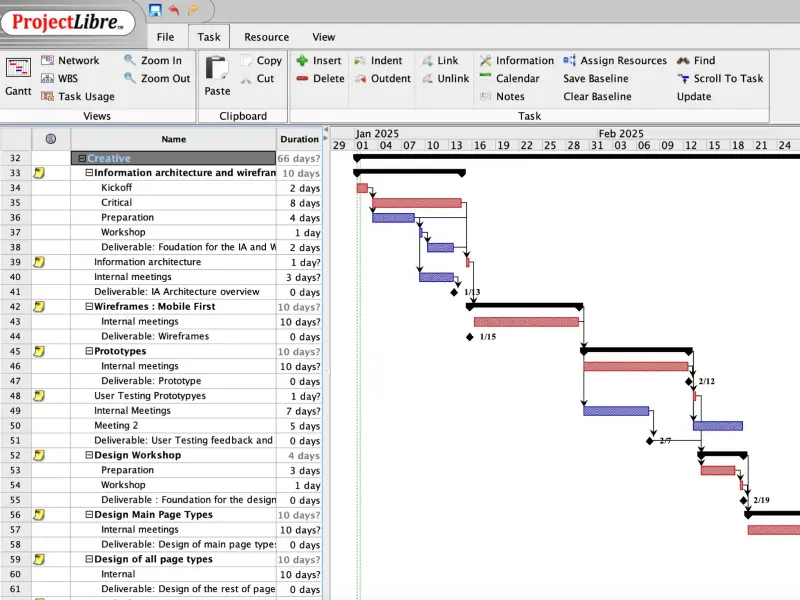
- Gantt Charts: Fully functional, with drag-and-drop tasks
- Resource Management: Assign resources, track workloads
- Network Diagrams & Critical Path: Visualize dependencies clearly
Overall: Functional, if not flashy. You won’t get modern SaaS niceties like auto-updating dashboards or real-time collaboration out of the box.
Performance & Reliability
ProjectLibre is stable for typical projects. Opening large .mpp files occasionally introduces minor lag, but crashes are rare.
- Handles complex projects (hundreds of tasks) without major issues
- CPU and memory footprint is modest
- Occasional quirks in dependency recalculation
Features Breakdown
| Feature | ProjectLibre | Notes |
|---|---|---|
| Gantt Charts | ✅ | Fully interactive, customizable |
| WBS (Work Breakdown Structure) | ✅ | Supports hierarchy and subtasks |
| Resource Management | ✅ | Assign, track, and view workloads |
| Critical Path & Network Diagrams | ✅ | Auto-calculates dependencies |
| MS Project File Compatibility | ✅ | Opens .mpp files directly |
| Collaboration | ⚠️ | Local-only unless using cloud version |
| Cloud Version / AI | ⚠️ | Limited, paid optional |
Pros
- Free & open-source — no subscription, no license hassle
- MS Project compatible — ideal for legacy teams
- Cross-platform — Windows, Mac, Linux
- Feature-rich — covers most classic PM needs
Cons
- UI is dated — not visually modern
- Collaboration limited — local projects only unless you pay for cloud
- Some bugs & quirks — dependency calculations can occasionally glitch
- Learning curve — not as intuitive as SaaS alternatives like Asana or ClickUp
Who Should Use It
- Students or educators learning project management
- Freelancers & small teams needing professional PM tools without a budget
- Organizations transitioning away from MS Project
- Anyone who prefers desktop software over cloud SaaS
Verdict
ProjectLibre Desktop is impressive for a free tool. It doesn’t replace the sleekness of modern SaaS PM tools, but for serious project planning, it delivers core functionality with stability and MS Project compatibility.
If you’re looking to ditch the Microsoft tax or just want a capable PM tool for desktop, ProjectLibre is worth exploring.
Explore it here:
 Project_Libre